


Domain and Hosting

Domain & Hosting
A domain name refers to the URL people type in a web browser’s address bar to access your site. In other words, domain names offer a convenient way for people to access websites.
Without it, they would have to use a numerical label assigned to every website and server on the internet, also known as an IP address.
Domain & Hosting
A domain name refers to the URL people type in a web browser’s address bar to access your site. In other words, domain names offer a convenient way for people to access websites.
Without it, they would have to use a numerical label assigned to every website and server on the internet, also known as an IP address.
Generally, domain names are comprised of two main parts – a second-level domain (SLD) and a top-level domain (TLD). Second-level domains usually consist of words or phrases, while top-level domains are the predetermined extensions that follow.
For example, in the case of google.com, the second-level domain is google, and .com is the TLD.
To get a domain name for your website, you need to register it first. Domain registration is the process of reserving a name on the internet for a certain period. Usually, you need to renew the license once per year, but you can pay up in advance for up to 10 years for the domain to be registered under your name.
Companies or organizations that sell and manage domain name registrations are called domain registrars. Domain registrars are listed under ICANN (Internet Corporation for Assigned Names and Numbers), an authority that coordinates and manages domain databases on the internet.
However, before moving on to domain registration with a domain registrar, it is essential to check your custom domain’s availability.
Domain Name Checker
A domain checker will show the availability of your chosen domain and various domain extensions, along with their prices. If the domain is taken, the domain checker will offer several alternatives. If domain name you like is taken, try a domain name generator to help you come up with something unique!
Types of Domain Extensions and Pricing
Domain extensions or top-level domains (TLDs) refer to the last part of a domain name.
As the name suggests, TLDs claim the highest spot on the internet’s DNS (domain name system) hierarchy. There are hundreds of TLDs available on the web, which are maintained and regularly updated by the IANA (Internet Assigned Numbers Authority).
IANA categorizes TLDs into four main categories based on their purpose, and location, including:
- gTLDs (Generic Top-Level Domains). The most commonly used domain name as it fits any website purposes. This includes the well-known .com, .org, and .net. as well as other unique names such as .xyz, .biz, and .tech.
- sTLDs (Sponsored Top-Level Domains). These domains are restricted to certain organizations and groups. Common examples include .gov for governmental sites, .edu for educational institutions, and .post for postal services.
- ccTLDs (Country Code Top-Level Domains). It notes a certain part of the territory or location under the ISO codes. For example, .us for USA, .in for India, .es for Spain, .id for Indonesia, and .co.uk for United Kingdom.
- Infrastructure Top-Level Domain. It consists of only one domain name, which is .arpa, representing the ARPA (Address and Routing Parameter Area). This domain name is primarily reserved to solve internet-infrastructure issues. Ideally, TLD should represent the purpose of your site. For example, a .club domain should be used for the sites of clubs, .org – for organizations, .com – for commercial websites and so on.
If you want to register a domain name, it can be beneficial to know all of your options to find the perfect extension. Below are some.
Once you have purchased the domain name, complete the domain registration by accessing the Home section on your hPanel and clicking the Setup button. It will direct you to the Domain Order Setup page, where you’ll be required to fill in the domain registration details.
Web Hosting
In this tutorial, you’ll learn what web hosting is and everything you need to know before creating a website.
Web hosting services allow you to publish the website on the internet. If you buy a hosting service from a provider, you will have a portion of their web servers to store your website’s files and data.
Whenever someone types in your website’s domain name, your web hosting provider will be responsible for sending its content to the visitor.
Web hosts also provide beginner-friendly tools for all users so that you can manage the website with little to no technical skills.
In addition to storing website files, a web host protects the server and your website files from malicious attacks.
Some web hosting companies, such as xxxxxxxx, also provide domain registration to help you create a website even quicker and more efficiently.
That said, it is essential to do thorough research before choosing a hosting company. There are a few factors you need to consider, including:
- User-friendliness. Every web host provides a control panel to manage your web hosting account. Make sure the dashboard offered is easy-to-use and has extensive functionality.
- Server speed and uptime. Choose a web hosting company that ensures fast loading speeds and offers an excellent uptime guarantee so that your site experiences minimum downtime.
- Pricing and plans. Before purchasing a hosting plan, it helps to consider the add-ons and renewal fees that would fit your budget in the long-term.
- Customer service. Pick a hosting company with a reliable support team to give you immediate assistance when running into a technical issue.
Signing up for web hosting is quite easy. Just sign up using your email and pick one of the web hosting plans available. Additionally, we offer a 30-day money-back guarantee in case you are not satisfied with the service.
Website Hosting and Pricing
Now let us explore what types of hosting there are.
we offers several hosting plans suitable for anyone who wants to create a website – whether it is a personal blog or an eCommerce site. Here’s a quick overview:
- shared hosting is where multiple websites share the same physical server and have a set amount of storage and resources. Shared hosting is the most affordable option out of all and is perfect for small businesses or personal websites.
- A physical server is virtually separated into multiple partitions, giving users a private environment with their dedicated resources. This hosting type works great for websites with medium-to-high traffic.
- It uses a cluster of different servers to host the website. Whenever one server experiences downtime, another server quickly steps in to keep your site running. Cloud hosting is the ideal solution for sites that need high-availability, such as eCommerce stores.
- It provides an optimized environment, performance, and security for hosting WordPress sites. This hosting plan offers WordPress-related features and customization options, so you can easily manage and grow your site.
- A web hosting service enables you to create custom email addresses based on your domain name (e.g., janedoe@yourdomain.com).
If you’re just starting out, we’d highly recommend going with shared hosting first – it’s affordable, fully managed, and easy to use. You don’t need any technical background as the our team manages every back-end technicality.
On the other hand, if you have some technical knowledge and want more control over managing a server on your own, VPS and cloud hosting are the way to go. It all comes down to your budget and what kind of website you want to build.
How a Domain Name and Web Hosting Work Together to Create a Website?
Domain and hosting work hand-in-hand – imagine that both your IP address and the domain name act as your website’s address, and web hosting is the actual house. Without web hosting, your site can’t exist on the internet.
Therefore, you need to sync and point your domain name to your web hosting provider after you buy it.
To avoid too much hassle, we highly recommended purchasing a domain name and web hosting from the same place. This way, you don’t need to worry about linking them manually, and you can start creating your website right away.
Let’s briefly go over the steps of how to build a website :
- Pick your domain name and check its availability using the domain checker. Choose the option that best suits your needs, finalize the order, and complete the domain registration.
- Create an account on Wen hosters and pick a suitable hosting plan for the website.
- Choose a platform to start building your site – a website builder, an eCommerce script, or a CMS(content management system). With Suitable Platform.
- Customize your website, upload files, and add content. Finally, when you’re ready – publish it.
| Variant | Basic |
|---|---|
| Brand | Creative Studios |
Based on 0 reviews
Only logged in customers who have purchased this product may leave a review.
Related products
-
Bharat Inc., Custom Designs, DESIGN & CREATIVE
Bill Books
Bill Books
Whether you’re a contractor, shop owner or music teacher, Bill books helps you manage your invoices, expenses and quotations.
BILL-BOOK, commerce, accounts. One in in which an account is kept of promissory notes, bills of exchange, and other bills payable or receivable: it ought to contain all that a man issues or receives.
We provide you Best Cloud based invoicing Bill books. We design bill books in A4 and A5 size in both landscape and portrait format with 1 colour & multi colours. Expansive books to record all aspects available in different sizes, colour. combined with latest technology and latest equipment offers wide range of bill books.
Combining latest technology and latest equipment we are engaged in offering wide range of Bill Book, designed by highly expertise and devoted team of skilled professionals and trained workers of the industry. Top rate printing quality with comprehensive details with Expansive books to record all aspects available in different sizes color widely used in various corporate offices, organisations, business applications.
SKU: EBQ8LSPI -
Bharat Inc., Custom Designs, DESIGN & CREATIVE
Marketing Collateral Design and Production
Marketing Collateral Design and Production
Stunning Marketing collateral brings life to your imagination. Whether you are planning to launch your brands online? Or Need any help for campaign promotions for your services? We provides marketing collateral services that include ingenious support and technical expertise to market your brand across the print media and promotions online. From product brochures to Corporate Presentations, Republic provides end to end solutions to all your marketing needs and will ensure that the marketing materials developed would adhere to your corporate identity.
Marketing collateral is a type of media or advertising used along the sales cycle to achieve a certain goal. From industry to industry and business to business, there is a large range of marketing collateral available. And of course, when you consider both digital and print material, the list gets longer.
SKU: EBRQ3JTA -
Bharat Inc., CORPORATE GIFTING & BRANDING, DESIGN & CREATIVE
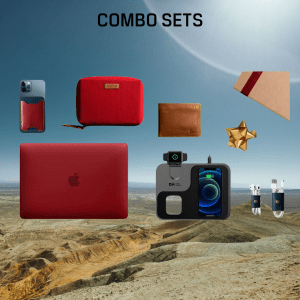
Corporate Giftings-Combo Gift Sets
Combo Gift Sets
Celebrate all special occasions, big and small, to inspire and connect with your teams through our massive selection of corporate gifts layered with customisation and personalization to help you find the perfect gift every time.
We are supplying exclusive corporate gifts and combos. These include gifts and give always for events, students, management, clients or staff. Our wide range of products include combo gift sets like t-shirts, bags, electronics, drink ware’s, household items which can be branded with your logo to make it more attractive and add more value. You are bound to be impressed by the large selection of company gifts available, from the more traditional and standard items to things that are a little bit different.
We are committed to supplying high-quality Branded Business combo Gift sets to our customers, at the same time ensuring maximum customer satisfaction. Our online ordering service allows us to reduce the costs for you, meaning your return on investment in terms of what you will gain from your branded gifts through advertising and exposure will be as high as possible. We supply to companies from across industries anywhere in India. We also provide customized brand in different kind of packaging. We provide Combo Sets products Best Quality Branded Corporate Gift Items, Business Promotional Products with Custom Logo Branding.
SKU: EB8F653W -
Bharat Inc., Custom Web Development, DESIGN & CREATIVE
E-Commerce Website
e-Commerce Website
ONLINE STORE! JUST THE CLICK AWAY!! Make your Store Beautifully and Get More Orders Online. Use Single Platform to Sell Anything, Anywhere to Anyone, In Person with Point of Sale (POS) and Online through your Dedicated e-Commerce website, Social Media, and Online marketplaces. Increase Productivity.
Electronic commerce (ecommerce) refers to companies and individuals that buy and sell goods and services over the Internet. Ecommerce operates in different types of market segments and can be conducted over computers, tablets, smartphones, and other smart devices. Nearly every imaginable product and service is available through ecommerce transactions, including books, music, plane tickets, and financial services such as stock investing and online banking. As such, it is considered a very disruptive technology.
SKU: EBCMDHS7 -
Bharat Inc., Custom Designs, DESIGN & CREATIVE
Marketing Material
Marketing Materials
Have you got a big trade show coming up or a new product launching? Here’s how to magic up an effective suite of marketing materials to promote yourself.
Whether you’re showcasing your latest wares, promoting a red letter day event at your business, or simply announcing to the world that you’re here and you’re awesome, there are a few rules of thumb that will help you save time, get fantastic results and hopefully have some fun along the way.
Marketing materials are any type of content that help tell the story of your brand, or sell to or inform your audience. There are two main types of marketing materials: print or digital.
SKU: EB1419T6





There are no reviews yet.